
Download PoemGenerator io – AI Writing Assistant, Free, Secure & Easy to Use
Overview
PoemGenerator io is a full‑version web‑based AI writing assistant designed to spark creativity and help writers of any skill level craft verses in seconds. Launched on Softonic on April 23 2025, this tool leverages advanced natural‑language processing to suggest rhyme schemes, meter, and thematic imagery tailored to user prompts. Whether you’re a poet looking for fresh inspiration, a teacher needing quick poem examples for a classroom, or a content creator seeking lyrical flair, PoemGenerator io delivers instant, high‑quality results directly in your browser.
The platform runs on all major browsers—including Internet Explorer, Firefox, Opera, Safari, and Chrome—so there’s no need for separate installations or operating‑system restrictions. Its intuitive interface combines a clean text editor with real‑time AI suggestions, making the writing process both fluid and enjoyable. Security is built into the service; all data is processed over HTTPS, and the application does not store personal content unless you explicitly save it to your own cloud storage.
Because it is a web app, updates are automatic, ensuring you always have access to the latest AI models without manual downloads. PoemGenerator io also offers a free tier with unlimited poem generation, while a premium subscription unlocks advanced features such as custom poetic styles, batch generation, and integration with popular note‑taking apps. In short, PoemGenerator io stands out as a versatile, accessible, and secure tool for anyone who wants to explore the art of poetry without the hassle of traditional software installations.
Key Features that Make PoemGenerator io a Must‑Have AI Tool
- Instant Verse Generation: Type a theme or a few keywords, and the AI produces a complete poem in seconds, complete with rhyme and meter.
- Multiple Poetic Forms: Choose from sonnet, haiku, limerick, free verse, and more—each automatically formatted to fit the selected structure.
- Real‑Time Editing Suggestions: While you write, the assistant highlights syllable counts, suggests synonyms, and offers alternative line breaks to improve flow.
- Custom Style Profiles: Premium users can train the AI on their own poetic voice, enabling personalized tone, vocabulary, and rhythm.
- Cross‑Browser Compatibility: Works seamlessly on IE, Firefox, Opera, Safari, and Chrome, ensuring no user is left behind.
- Secure Cloud Saving: Save poems to your personal cloud workspace with end‑to‑end encryption; you retain full ownership of your creations.
- Batch Generation Mode: Generate dozens of poem variations at once—ideal for educators, marketers, or anyone needing bulk lyrical content.
- Integration Options: Export poems directly to Google Docs, Microsoft Word, or popular note‑taking apps via built‑in connectors.
- Free Unlimited Use: The core poem generation engine is free forever, with no hidden limits or ads.
- Regular AI Model Updates: The backend is continuously refined, delivering more nuanced language understanding and creative flair over time.
These features combine to create a robust, user‑friendly environment that encourages experimentation while maintaining professional quality. Whether you’re drafting a single stanza for a personal project or need a batch of marketing copy with poetic flair, PoemGenerator io scales to meet the demand.
Installation, Usage Instructions & Compatibility
Getting Started – No Download Required
Because PoemGenerator io is a web application, there is no traditional installation process. Simply navigate to https://poemgenerator.io using any supported browser. The first time you visit, you’ll be prompted to create a free account—this only requires an email address and a password. Account creation unlocks cloud saving and syncs your custom style profiles across devices.
Step‑by‑Step Workflow
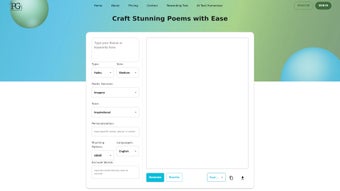
- Log In: Access your dashboard, where you’ll see the main editor, a sidebar for selecting poetic forms, and a panel for AI suggestions.
- Enter a Prompt: Type a theme, a word list, or a short sentence that captures the mood you want.
- Select a Form: Choose from the dropdown menu (e.g., sonnet, haiku, limerick). The AI automatically adapts its output to match the structural rules.
- Generate: Click the “Create Poem” button. Within seconds, a complete poem appears, highlighted with rhyme and meter markers.
- Edit & Refine: Use the real‑time suggestions panel to tweak word choice, adjust syllable counts, or explore alternative lines.
- Save or Export: Press “Save to Cloud” for future access, or click “Export” to download a .txt, .docx, or .pdf version.
Operating System & Browser Compatibility
PoemGenerator io is fully compatible with Windows, macOS, Linux, iOS, and Android because it runs in the browser. Supported browsers include:
- Internet Explorer (latest version)
- Mozilla Firefox (latest release)
- Opera (latest release)
- Apple Safari (latest release)
- Google Chrome (latest release)
The application adheres to modern web standards (HTML5, CSS3, and JavaScript ES6), guaranteeing fast load times and smooth interactions even on older hardware. For the best experience, we recommend using the latest version of Chrome or Safari, as they provide the most robust support for the AI’s real‑time rendering engine.
Security & Updates
All data transmission is encrypted via HTTPS, and the platform does not retain any personal poem content on its servers unless you explicitly choose to save it. Updates to the AI model and user interface are deployed automatically; users never need to download patches or restart the application.
Pros, Cons, Frequently Asked Questions & Final Verdict
Pros & Cons
- Pros:
- Free unlimited poem generation – no hidden paywalls.
- Works on any device with a modern browser.
- Supports a wide range of poetic forms out‑of‑the‑box.
- Real‑time editing suggestions improve learning.
- Secure HTTPS connection and optional encrypted cloud storage.
- Automatic AI model updates keep the tool cutting‑edge.
- Batch generation saves time for educators and marketers.
- Cons:
- Advanced custom style profiles are locked behind a premium subscription.
- Internet connection is required; offline usage isn’t possible.
- Limited export formats (no direct integration with LaTeX for academic poetry).
- Some older browsers (e.g., legacy IE 8) may experience slower performance.
FAQ – Your Questions Answered
Is PoemGenerator io really free?
Yes, the core poem‑generation engine is completely free with unlimited usage. Premium features such as custom style training and batch generation are optional.
Do I need to install any software?
No. PoemGenerator io runs entirely in the browser, so you only need a supported web browser and an internet connection.
Can I export my poems to Microsoft Word?
Absolutely. After generating a poem, you can export it as a .docx file, which opens directly in Microsoft Word.
Is my data safe when I save poems to the cloud?
Yes. All cloud storage is encrypted using TLS 1.3, and poems are only stored on your account unless you delete them.
What poetic forms are supported?
PoemGenerator io includes sonnet, haiku, limerick, villanelle, free verse, acrostic, and many more. New forms are added regularly via automatic updates.
Conclusion – Should You Download PoemGenerator io?
PoemGenerator io delivers on its promise of a fast, secure, and versatile AI writing assistant for poetry lovers. Its zero‑cost entry point, combined with a rich set of features and seamless browser compatibility, makes it an attractive option for students, teachers, content creators, and hobbyist poets alike. While power users may eventually opt for the premium subscription to unlock custom style training, the free tier already provides more than enough capability to spark inspiration and produce publish‑ready verses.
The only notable limitation is the requirement for an internet connection, which is inherent to cloud‑based AI services. Overall, PoemGenerator io stands out as a high‑quality, user‑friendly tool that democratizes poetic creation. Ready to unleash your inner bard?
Download PoemGenerator io now and start composing poems in seconds!



.png)



